Author: RYU

advertisements
  • Create Your Own Valentine Card with Online Resources

    Create Your Own Valentine Card with Online Resources

    Happy Friday! The bird is singing early in the morning and it would be good to learn how to create your own valentine card online for free. A valentine card is almost everyone’s headaches when Valentine’s Day is around the corner. Thus, learn it earlier so that you will have more time to create a special valentine card for your loved one although Valentine’s Day is few more months to go. There are quite a number of ways to build a valentine card online but here I am going to share you a total free way. All you need is a color printer beside your computer and Photoshop. Ms Paint can be used if you do not have Photoshop installed in your computer.

    Step One: Decide the size of your card. You can make an extra large card for a big surprise or just an ordinary card with special graphics. The choice is up to you. Once you have decided the size, open Photoshop and go to File -> New (Ctrl + N) to open a new image. Choose your desired width and height.

    Step Two: Get some lovely graphics online. Go to any search engine and look for “love background”. Make sure they are nice and lovely. Open the image in Photoshop and crop the image to make it as background. You can resize or shrink it to make it perfect.

    Step Three: Make your own valentine card special with a photo of you and your loved one. Now you have a nice background, try to add a photo of you and your loved one would be a good idea. Again, you can crop the card with a love or round shape using the Elliptical Marquee tool in Photoshop.

    Step Four: Put some words on your valentine card. Words explain how you feel for your loved one. It is important to put what do you feel and what you want to say to her or him at this special day. It will be awesome if you can put a Valentine’s Day quote to your card. For example, a quote from Frederick Keonig – “We tend to forget that happiness doesn’t come as a result of getting something we don’t have, but rather of recognizing and appreciating what we do have.”

    Step Five: Print it out. Get some paper and print it out with your printer. Use normal paper to print a few times and see if you need to edit anything. Instead, you may go to the nearest stationery store to get some plain cards if you want to make your valentine card extraordinary. Last but not least, yours sincere signature.

    make your own valentine card

    See also:  Make Your Own Pokemon Card, Create Your Own Superhero

    Steps above are one of the greatest ways to design a customized valentine card. Alternatively, you can always use an Android app or iPhone App to create a valentine card. Sincerely Ink, YourCards, Postale, Artogram, Red Stamp, SnapShot Greeting Card, Bill Atkinson PhotoCard, Postagram, someecards, Cards (by Apple), Phoster, and Postino are a few famous apps that allow you to make your own card. If you have a better idea to create your own valentine card, please share it with the comment function below. All the love birds in the world would like to hear that.

  • Design Your Own Converse in 5 Steps

    Design Your Own Converse in 5 Steps

    With 5 easy steps, you can now design your own Converse sneakers online. If all is well, by the end of the third week you can have your own customized Converse arrive at your doorstep. Isn’t that sounds very alluring? If you want to wear a Converse, wear it cool. Now you can be the coolest by wearing one unique Converse that no one else has it before. You can create your own Converse and choose any design or color you want on each part of the shoes including outside body, heel stripe, top part, or the material in inside body. The happiest part of it is the price that cost only from $45 for a pair of customized Converse. What are you waiting for? (This tutorial is for anyone who have never design a Converse online before, the step by step guide is very specific.)

    1. Go to Converse.com and you will see Shop and Create button on top. Mouse over the Create button and click on the Design Your Own button.

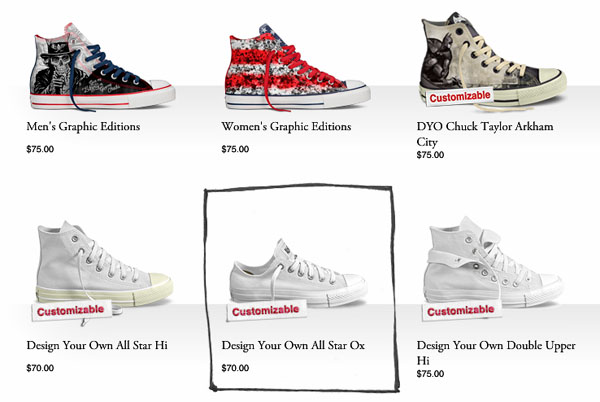
    2. You will be lead to a page full with customizable Converse sneakers. Whether it is for men or women, there are always more than 20 different types of style available in the store for their customers to customize. Chuck Taylor Arkham, Slip, All Star Hi, All Star OX, Double Upper Hi, Double Upper OX, Poorman Weapon, Star Player Hi, Double Tongue, DC Comics, Nean OX, and many more. Select anyone and go!

    customize Converse

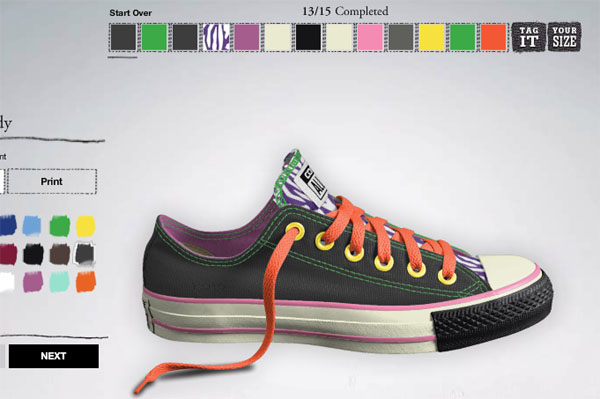
    3. Lots of panels will pop up now but don’t get shock. Every function is indispensable for you to create your own Converse and make it nice. There will be a panel on top showing you how many steps you need to go through to complete the design. For example, a customize Chuck Taylor All Star OX Canvas will have 15 steps.

    4. Complete all the necessary steps follow the top panel. Tag your shoe and make it yours. You can tag an ID at low rear or heel strip depending on the shoe styles.

    design Converse

    5. Last but not least, view the shoe again and again to make sure everything is what you want. You can then select the gender according to Converse sizing system, gender and quantity. Once the design is satisfied, proceed to the payment page, key in shipping address and it will be yours in less than three weeks.

    Reference: Design your own Converse 

    This article is written by Benjamin Kutcher, a reader of createownthings.com. If you would like to write for us, please use the contact form to contact us. We accept any DIY article related as long as you create, customize, make and design our own things.

  • Make Your Own iPhone Case

    Make Your Own iPhone Case

    I purchased an iPhone Case for my iPhone 5 less than two weeks ago, however, I started to feel bored every time I look at my phone. A typical iPhone case costs from $10 to $70 depending on the quality. It is going to cost me a lot of money if I have to change my iPhone case every two weeks and what am I going to do with the old cases? In order to change the look of my iPhone, I know that I have to make my own iPhone case and that has to be cheap so that I can change it every two weeks. I look around some information online and found few websites that provides a real good online application for their users to design a customized iPhone case. If you are just like me who loves to play around with cases, you should try to make your own iPhone case with the steps below.

    First of all, choose your iPhone model

    iphone-model
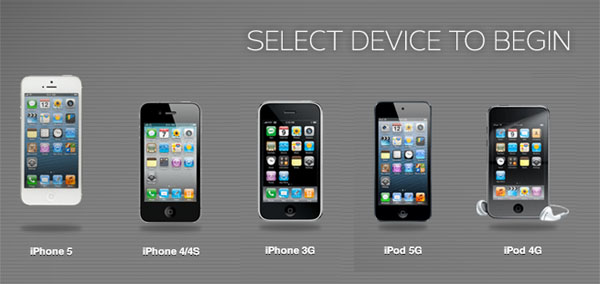
    The first step is to choose an iPhone model. Make sure you choose the correct model because an iPhone 3G case does not fit for an iPhone 5. iPhone 3G, iPhone 4/4S, iPhone 5/5S, pick one and then go!

    Choose the quality you prefer

    iphone case
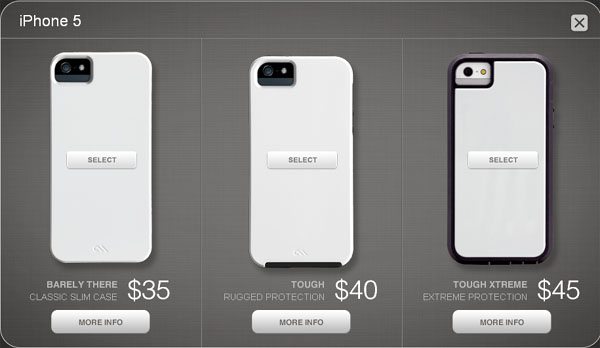
    There are different types of case quality available in the market. A Barely There which is also known as classic slim case cost $35. They are ultra-thin and features shock-absorbing interior liner which adds a better protection to an iPhone. You may go for Tough case which cost $40 if Barely There is too thin for you. A Tough iPhone case added with an enchanced 2-piece design with impact resistance and shock dispersion. If that is not tough enough for you, you may go for Tough Xtreme case which adds an extra protection to your iPhone. Tough Xtreme protects an iPhone against shock, drop, rain water, dust, vibration, and anything that could be happen. All these cost only $45 dollars. So, which one is your choice?

    Design your own iPhone case

    customized iphone case

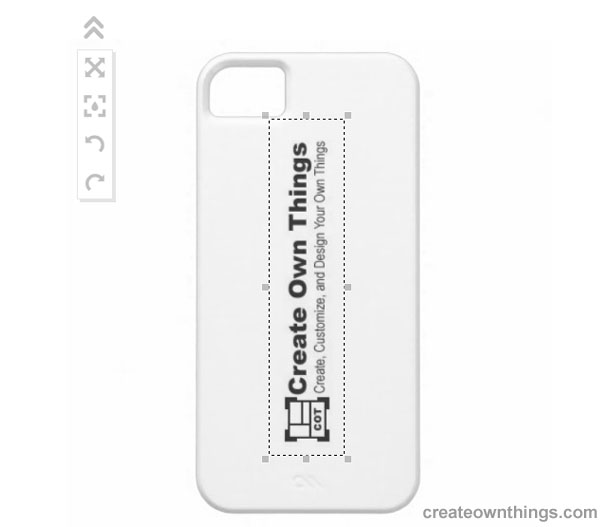
    It is time to design your own iPhone case once you have chosen the quality you want. Firstly, get ready of the image you want to put on your iPhone case. You can create any image you want using either Adobe Photoshop or Microsoft Paint otherwise you may use an online program to add text or image to your design. A virtual iPhone case with your design on it will be shown in front of you once you upload an image from your computer. Now you can use the customization tools at the right panel to adjust the size your image or rotate it to any preferred angle.

    Place Order!

    Place your order by clicking the Add To Cart button if you satisfied with your design. Changing a new case every two weeks will definitely cost you a lot but it will not cost a big fortune if you just change the skin. A new skin can be changed as long as you keep the case in perfect condition.