Tag: online

advertisements
  • Design Your Own Converse in 5 Steps

    Design Your Own Converse in 5 Steps

    With 5 easy steps, you can now design your own Converse sneakers online. If all is well, by the end of the third week you can have your own customized Converse arrive at your doorstep. Isn’t that sounds very alluring? If you want to wear a Converse, wear it cool. Now you can be the coolest by wearing one unique Converse that no one else has it before. You can create your own Converse and choose any design or color you want on each part of the shoes including outside body, heel stripe, top part, or the material in inside body. The happiest part of it is the price that cost only from $45 for a pair of customized Converse. What are you waiting for? (This tutorial is for anyone who have never design a Converse online before, the step by step guide is very specific.)

    1. Go to Converse.com and you will see Shop and Create button on top. Mouse over the Create button and click on the Design Your Own button.

    2. You will be lead to a page full with customizable Converse sneakers. Whether it is for men or women, there are always more than 20 different types of style available in the store for their customers to customize. Chuck Taylor Arkham, Slip, All Star Hi, All Star OX, Double Upper Hi, Double Upper OX, Poorman Weapon, Star Player Hi, Double Tongue, DC Comics, Nean OX, and many more. Select anyone and go!
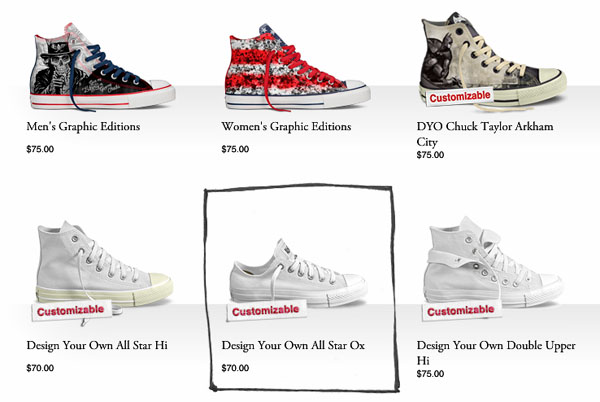
    customize Converse

    3. Lots of panels will pop up now but don’t get shock. Every function is indispensable for you to create your own Converse and make it nice. There will be a panel on top showing you how many steps you need to go through to complete the design. For example, a customize Chuck Taylor All Star OX Canvas will have 15 steps.

    4. Complete all the necessary steps follow the top panel. Tag your shoe and make it yours. You can tag an ID at low rear or heel strip depending on the shoe styles.
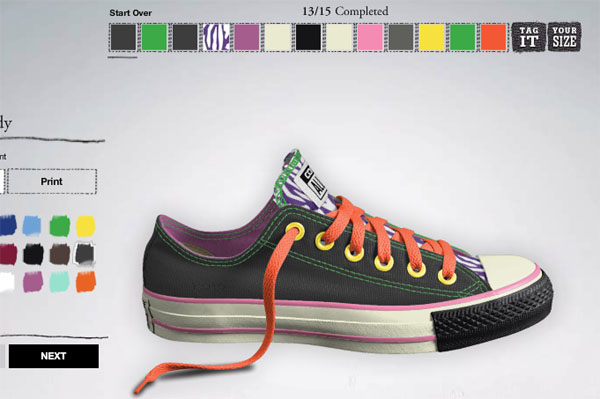
    design Converse

    5. Last but not least, view the shoe again and again to make sure everything is what you want. You can then select the gender according to Converse sizing system, gender and quantity. Once the design is satisfied, proceed to the payment page, key in shipping address and it will be yours in less than three weeks.

    Reference: Design your own Converse 

    This article is written by Benjamin Kutcher, a reader of createownthings.com. If you would like to write for us, please use the contact form to contact us. We accept any DIY article related as long as you create, customize, make and design our own things.


  • Make Your Own Birthday Card

    Make Your Own Birthday Card

    Do you have a friend, lover, or family member with a milestone birthday just around the corner? Finding the best birthday presents for your loved one may be driving your headaches. A cool birthday card is still an important matter even though you have found an awesome birthday present. Here in this article I am going to teach you how to make your own birthday card. It will be a unique birthday card that you can’t find elsewhere.

    Use stamping kit to make a birthday card

    birthday card

    I have mentioned this method before in one my previous article Make Your Own Chirstmas Cards. It is certainly a good and simple idea because stamping kit is available for sale in any stationary store or grocery store. There are so many types of fonts available and you can pick any one to use on your birthday card. Alternatively, you can also mix two or three different types of fonts to create your message. The most important thing on the card is nothing but the “HAPPY BIRTHDAY” words. Other than fonts, colors are important too. Choose a plain card with your preferred color and stamp your message on it using different color stamp pads.

    Combine a few cards into one

    birthday card

    There was once I went into a store that sells thousands of birthday cards. I like the button design on the first card but the graphic I like is on the second card. While I kept looking for another card, there is a ribbon I love on the third card. It is weird if I give three birthday cards to a friend on his birthday. Here comes a great idea! I bought all of them, and then I combine them into one special birthday card using a pair of scissors and a bottle of glue. As a result, I make my own birthday card that can’t find in any shop. My experience told me that you can combine two, three, four, or even five birthday cards into one. It all depends on your creativity.

    Make your own birthday card online

    There are at least a hundred websites offering free card maker online. You can simply log on to a few famous website to make your own birthday card using their online application and then print it out. Look for those websites that offer free printable cards. Some of the websites are offering ready-made graphics where you can just drag and drop the graphics you want on your birthday card. You can then add your own text or photo onto the card. Besides, not to forget that we are living in a world with advanced technology, there are tons of free mobile apps available for you to download and create your own birthday card. These apps usually allow you to connect both your smart phone and PC together and then you can print the card out from your printer easily.

    Besides birthday card, there are still many cards you can do it your own: Make Your Own Pokemon Card.

  • Create Your Own Pokemon Card with Pokemon Card Maker

    Create Your Own Pokemon Card with Pokemon Card Maker

    About two weeks ago, we gave an idea to make your own Pokemon card online for free. Today, while the birds are singing, we are going to teach you how to create your own Pokemon card with Pokemon card maker, it is free too! Make sure you have a good idea before going through the steps below. Keep in mind that you will only need three things to create a valuable Pokemon card – Creativity, Imagination, and Inspiration. Who knows you can sell Pokemon cards online and make a good living in the future? Alright, let’s get it started.

    Step 1: There are hundreds of online Pokemon card maker websites out there but here in this tutorial we are going to use TradingCardMaker.net as an example. This is because Trading Card Maker is very straight forward and easy to be used. Open a web browser and go to the url. You will see a sample Pokemon card right in front of you. The panel of this website is a little bit messy but they are all very useful buttons.

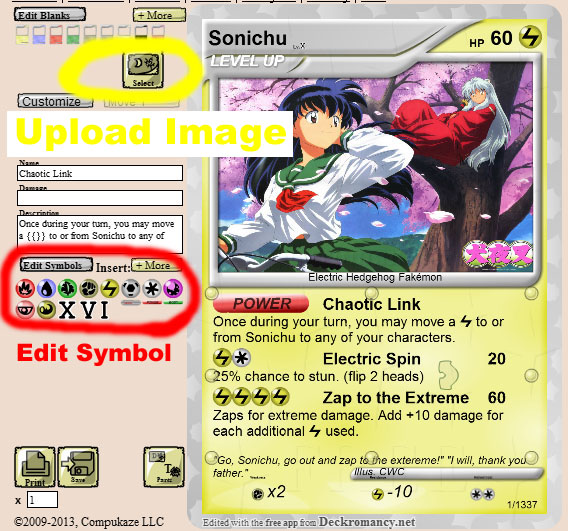
    Step 2: Click on the “Select” button as shown below to upload your desire image on the Pokemon card. Make sure the image you are uploading is in high resolution and nice. You may need to wait a few more seconds if the file size is too big.

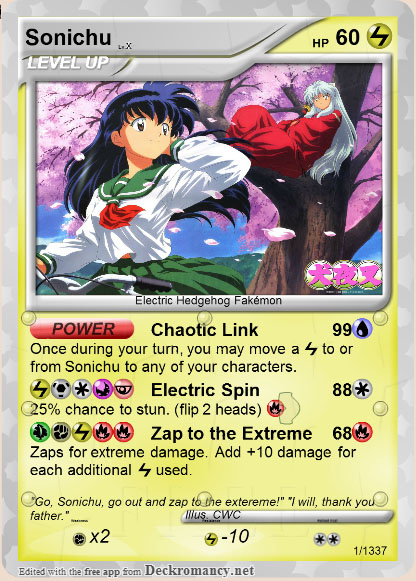
    Pokemon card

    Step 3: Now click on the Move 1, whatever you type in will be appearing at the red button on your card. We will recommend you to keep the “POWER” because that is the basic thing for a Pokemon card. Next you can put the name for Move 1 as well as the damage level and description. You may also put a thunder symbol in your card by typing {{}} into the description box.

    own pokemon car

    Step 4: Repeat Step 3 for Move 2 and Move 3 and your card will be completed. Under the symbol, there are two buttons where you can select to print the Pokemon card you have just created or save it to your local computer. Well, this awesome online application makes our day brighter. Does it brighten your day too?