Tag: cards

advertisements
  • Create Your Own Valentine Card with Online Resources

    Create Your Own Valentine Card with Online Resources

    Happy Friday! The bird is singing early in the morning and it would be good to learn how to create your own valentine card online for free. A valentine card is almost everyone’s headaches when Valentine’s Day is around the corner. Thus, learn it earlier so that you will have more time to create a special valentine card for your loved one although Valentine’s Day is few more months to go. There are quite a number of ways to build a valentine card online but here I am going to share you a total free way. All you need is a color printer beside your computer and Photoshop. Ms Paint can be used if you do not have Photoshop installed in your computer.

    Step One: Decide the size of your card. You can make an extra large card for a big surprise or just an ordinary card with special graphics. The choice is up to you. Once you have decided the size, open Photoshop and go to File -> New (Ctrl + N) to open a new image. Choose your desired width and height.

    Step Two: Get some lovely graphics online. Go to any search engine and look for “love background”. Make sure they are nice and lovely. Open the image in Photoshop and crop the image to make it as background. You can resize or shrink it to make it perfect.

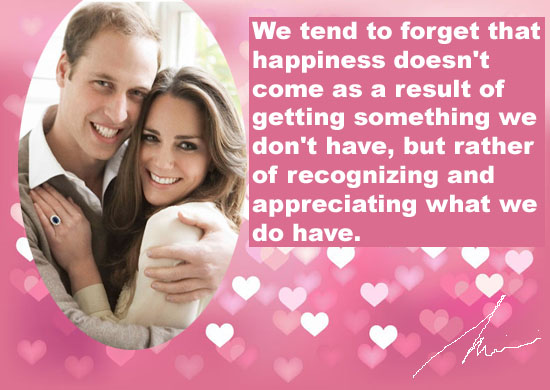
    Step Three: Make your own valentine card special with a photo of you and your loved one. Now you have a nice background, try to add a photo of you and your loved one would be a good idea. Again, you can crop the card with a love or round shape using the Elliptical Marquee tool in Photoshop.

    Step Four: Put some words on your valentine card. Words explain how you feel for your loved one. It is important to put what do you feel and what you want to say to her or him at this special day. It will be awesome if you can put a Valentine’s Day quote to your card. For example, a quote from Frederick Keonig – “We tend to forget that happiness doesn’t come as a result of getting something we don’t have, but rather of recognizing and appreciating what we do have.”

    Step Five: Print it out. Get some paper and print it out with your printer. Use normal paper to print a few times and see if you need to edit anything. Instead, you may go to the nearest stationery store to get some plain cards if you want to make your valentine card extraordinary. Last but not least, yours sincere signature.
    make your own valentine card

    See also:  Make Your Own Pokemon Card, Create Your Own Superhero

    Steps above are one of the greatest ways to design a customized valentine card. Alternatively, you can always use an Android app or iPhone App to create a valentine card. Sincerely Ink, YourCards, Postale, Artogram, Red Stamp, SnapShot Greeting Card, Bill Atkinson PhotoCard, Postagram, someecards, Cards (by Apple), Phoster, and Postino are a few famous apps that allow you to make your own card. If you have a better idea to create your own valentine card, please share it with the comment function below. All the love birds in the world would like to hear that.

  • Make Your Own Birthday Card

    Make Your Own Birthday Card

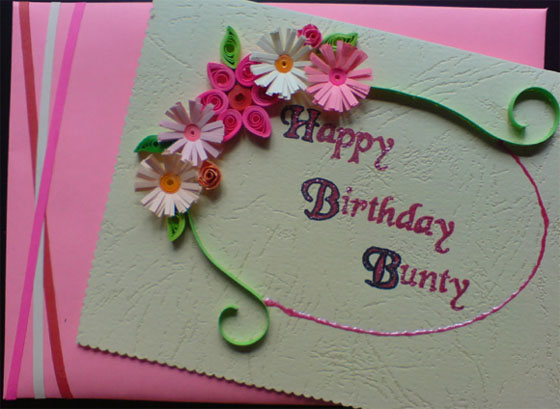
    Do you have a friend, lover, or family member with a milestone birthday just around the corner? Finding the best birthday presents for your loved one may be driving your headaches. A cool birthday card is still an important matter even though you have found an awesome birthday present. Here in this article I am going to teach you how to make your own birthday card. It will be a unique birthday card that you can’t find elsewhere.

    Use stamping kit to make a birthday card

    birthday card

    I have mentioned this method before in one my previous article Make Your Own Chirstmas Cards. It is certainly a good and simple idea because stamping kit is available for sale in any stationary store or grocery store. There are so many types of fonts available and you can pick any one to use on your birthday card. Alternatively, you can also mix two or three different types of fonts to create your message. The most important thing on the card is nothing but the “HAPPY BIRTHDAY” words. Other than fonts, colors are important too. Choose a plain card with your preferred color and stamp your message on it using different color stamp pads.

    Combine a few cards into one

    birthday card

    There was once I went into a store that sells thousands of birthday cards. I like the button design on the first card but the graphic I like is on the second card. While I kept looking for another card, there is a ribbon I love on the third card. It is weird if I give three birthday cards to a friend on his birthday. Here comes a great idea! I bought all of them, and then I combine them into one special birthday card using a pair of scissors and a bottle of glue. As a result, I make my own birthday card that can’t find in any shop. My experience told me that you can combine two, three, four, or even five birthday cards into one. It all depends on your creativity.

    Make your own birthday card online

    There are at least a hundred websites offering free card maker online. You can simply log on to a few famous website to make your own birthday card using their online application and then print it out. Look for those websites that offer free printable cards. Some of the websites are offering ready-made graphics where you can just drag and drop the graphics you want on your birthday card. You can then add your own text or photo onto the card. Besides, not to forget that we are living in a world with advanced technology, there are tons of free mobile apps available for you to download and create your own birthday card. These apps usually allow you to connect both your smart phone and PC together and then you can print the card out from your printer easily.

    Besides birthday card, there are still many cards you can do it your own: Make Your Own Pokemon Card.

  • Make Your Own Christmas Cards

    Make Your Own Christmas Cards

    “Oh, jingle bells, jingle bells. Jingle all the way. Oh, what fun it is to ride in a one horse open sleigh.” Every time I hear this song, the Christmas is around the corner. I usually find this song is playing on almost every street corner a month before Christmas. My mood is happy because Christmas is coming but on the other hand I always feel headache when I can’t find a special Christmas card for my family members. Thank god I found a way to make Christmas cards online for free! If you have been looking for a way to make your own Christmas cards, these amazing ideas may be useful for you.

    Use Stamping Kit to Create a Christmas card

     christmas-card

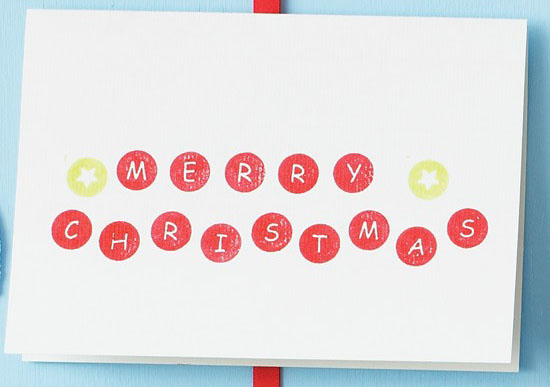
    Remember when I was a kid, I like to use alphabet stamping kit to create cards and bookmarks. I almost forgot this is a great way to create a unique Christmas card until I found my stamping kit in my drawer. There are many types of stamping kits available in the stationary stores. You can use one or combine any two font types you like to stamp the word “Merry Christmas” on your card.

    Free Online Card Maker

    Use a free online card maker is another pleasure way to make your own Christmas cards. GreetingsIsland.com and Zazzle.com are both my favorite websites to design Christmas card. The online application allows you to upload a photo and set it as the background of the card. You can also choose a nice font and put different colors on the card. There is a preview function at the website where you can view the card before print it out on a plain card using your own printer. You can hit the edit button and modify the design as many times as you want if it is unsatisfied.

    Create a Christmas card with Adobe Photoshop or MS Paint

    make-your-own-Christmas-cards 

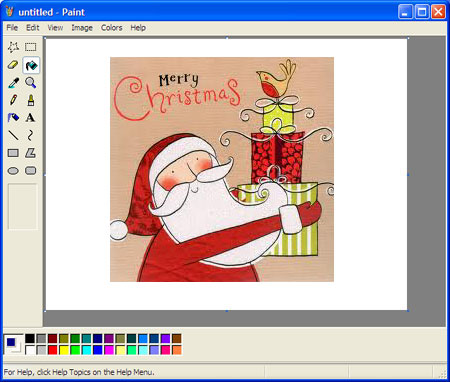
    This method is not easy. It requires some basic knowledge about Adobe Photoshop or MS Paint. First of all, you must at least have a prime idea on how to create a Christmas card. Wintertime, red sleigh, sleigh with reindeer, sleigh in snow, Christmas tree, Santa Claus, and so on. Second, you can use the tool line at the panel to adjust the thickness of each line you draw on the card. A beautiful card should have a few lines with the correct thickness. You may also draw a few stars or snow balls to spice up your Christmas card. Third, do not forget to color your drawing. Primary colors for Christmas are nothing but red and white. However, you may also use other sharp colors such as yellow, blue, or green. It can be anything because it is your very own Christmas card. Last but not leasth, put in your own message and then you can print it out with a color printer.

    The above ideas are my personal experience to make a unique Christmas card. Please share you ideas at the comment box below if you do have other ideas.

    “Did you ever notice that life seems to follow certain patterns? Like I noticed that every year around this time, I hear Christmas music.” – Tom Sim

    Do not miss this free online card maker -> Make Your Own Pokemon Card